
Download CanTax – AI‑Powered Canadian Tax Guidance Tool
Introduction
Tax season in Canada can feel like a marathon through dense legislation, confusing forms, and endless deadlines. For many, the anxiety of missing a deduction or mis‑interpreting a CRA rule outweighs the actual filing process. That’s where CanTax steps in.
Built on a state‑of‑the‑art natural‑language processing engine, CanTax delivers instant, personalized tax guidance the moment you need it—whether you’re at a desktop in a quiet office or on a mobile device during a coffee break. The platform combines the convenience of a chat‑based AI assistant with enterprise‑grade security, ensuring that every Social Insurance Number, T4 slip, or charitable receipt remains encrypted and inaccessible to unauthorized eyes. Because the service runs entirely in the browser, there’s no bulky installer, no periodic patching, and no risk of outdated tax tables lingering on a hard drive.
Instead, CanTax’s knowledge base refreshes in real time whenever federal or provincial tax rules change, keeping you aligned with the latest CRA updates without the need to manually download a new version each year. Whether you are a first‑time filer, a seasoned professional, or a tax‑focused consultancy, CanTax offers a free tier that lets you test the core AI chat, while the premium plan unlocks unlimited queries, advanced calculators, and a dedicated client‑management dashboard. In the following sections we’ll explore the platform’s core capabilities, walk through a step‑by‑step onboarding process, and answer the most common questions that prospective users ask.
By the end of this review you’ll understand why CanTax is quickly becoming the go‑to “tax companion” for Canadians who value speed, accuracy, and security.
Overview and Compatibility
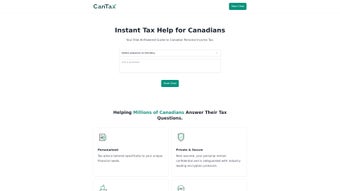
CanTax is a cloud‑native, AI‑driven tax assistance platform designed for Canadian personal income tax. The service operates through a responsive chat interface that understands natural language queries and returns concise, citation‑backed answers. Users can ask about RRSP contribution limits, provincial tax credits, medical expense deductions, or the impact of recent legislative changes, and the AI instantly references the latest CRA publications.
While the core product focuses on individual filers, a separate professional module enables tax firms to manage multiple client profiles, share encrypted documents, and generate batch reports—all within a single, secure dashboard. Privacy is central to the design: data is encrypted with AES‑256 both in transit (TLS 1.3) and at rest, and two‑factor authentication is mandatory for premium accounts. The platform also complies with Canada’s Personal Information Protection and Electronic Documents Act (PIPEDA), giving both individuals and enterprises confidence that their sensitive financial information is handled responsibly.
Because CanTax runs completely in the browser, it is compatible with any operating system that supports modern web standards. Officially tested environments include:
- Windows 10/11 – Chrome, Edge, Firefox, or Safari (via WSL)
- macOS 11 (Big Sur) and later – Safari, Chrome, Firefox
- iOS 14+ – Safari or the CanTax Progressive Web App (PWA)
- Android 9+ – Chrome or Android WebView with PWA support
- Linux distributions (Ubuntu 20.04+, Fedora 34+, etc.) – Chromium‑based browsers
The service requires a stable broadband connection (minimum 5 Mbps) for smooth document uploads and real‑time AI responses. Users on slower networks receive a text‑only fallback, ensuring that essential guidance remains accessible even under constrained conditions. No additional plugins, Java, or Flash components are needed, which simplifies deployment for corporate IT departments and reduces the attack surface compared with traditional desktop tax software.
Features, Pros, and Cons
- Instant AI Chat Assistance – Receive tailored answers within seconds, powered by a large‑language model trained on CRA documentation.
- Real‑Time Legislative Updates – Knowledge base refreshes automatically whenever federal or provincial tax rules change.
- Secure End‑to‑End Encryption – AES‑256 encryption in transit and at rest, with mandatory 2FA for premium users.
- Professional‑Firm Dashboard – Manage client profiles, share encrypted documents, and generate batch tax insights.
- Bilingual Support – Full English and French interfaces to meet Canada’s official language requirements.
- Cross‑Platform Accessibility – Use any modern browser on Windows, macOS, Linux, iOS, or Android.
- Interactive Tax Calculator – Input income figures to see instant refund or balance estimates.
- Document Upload & AI Validation – Drag‑and‑drop T4s, receipts, or medical expense forms for automatic extraction and deduction suggestions.
- Compliance Checklist – Step‑by‑step guide ensures all required forms and deadlines are met.
- Accounting Software Integration – Sync data with QuickBooks, Xero, and FreshBooks for seamless bookkeeping.
Pros
- Instant, AI‑driven answers eliminate the need to comb through lengthy CRA manuals.
- Automatic updates guarantee that guidance reflects the latest tax legislation.
- Robust security model (AES‑256, 2FA, PIPEDA compliance) protects sensitive personal data.
- Works on any device with a modern browser, offering true cross‑platform flexibility.
- Professional‑firm module streamlines client communication and document handling.
- Free tier provides generous query limits for occasional users.
- Bilingual interface respects Canada’s English‑French duality.
Cons
- AI provides advisory guidance only; final filing must still be reviewed by a qualified CPA.
- Complex corporate tax scenarios may exceed the AI’s current capabilities.
- Full functionality depends on an internet connection; offline use is limited to cached pages.
- Premium subscription required for unlimited queries, which could be a barrier for low‑income users.
- Document upload size capped at 10 MB per file, requiring large PDFs to be split.
Installation & Usage Instructions
CanTax is a cloud‑first solution, so there is no traditional installation. All you need is a reliable internet connection and a supported browser. Follow these steps to start using the platform:
- Create Your Account – Navigate to cantax.ca, click “Sign Up,” and provide your name, email, and a strong password. Verify the account via the activation link sent to your inbox.
- Enable Two‑Factor Authentication – After logging in, go to Security Settings and activate 2FA using an authenticator app or SMS. This step dramatically reduces the risk of unauthorized access.
- Select a Subscription Plan – Choose between the free tier (20 queries per month) or the premium plan (unlimited queries, advanced calculators, firm dashboard). Enter payment details (credit card or PayPal) if you opt for the paid option; all transactions are processed securely through Stripe.
- Configure Your Tax Profile – Input your province, filing year, marital status, and any other basic details. This information tailors AI responses to the correct tax regime and ensures accurate calculation of provincial credits.
- Start the AI Chat – Click the chat bubble in the lower‑right corner. Type a question such as “What non‑refundable tax credits am I eligible for in Ontario?” and press Enter. The AI will return a concise answer, cite the relevant CRA bulletins, and may ask follow‑up questions to refine the recommendation.
- Upload Supporting Documents (Optional) – Drag and drop T4 slips, charitable receipts, or medical expense invoices into the secure upload zone. CanTax scans the files, extracts key values, and automatically suggests applicable deductions.
- Review & Export – Once you have gathered all insights, click “Export Summary.” Choose PDF or CSV to download a formatted report that can be attached to your tax software or handed to a CPA for final filing.
- For Professional Firms – After creating a firm account, invite team members, assign client portfolios, and set permission levels. Each user can access the same AI chat and document‑validation tools under the firm’s umbrella, streamlining collaboration.
The entire onboarding workflow typically takes less than five minutes for simple personal queries and under ten minutes for a firm‑level setup. Because all processing occurs in the cloud, there are no local system requirements beyond a modern browser, and updates to the AI model are delivered automatically without user intervention.
Frequently Asked Questions & Conclusion
-
Is CanTax free to use?
CanTax offers a free tier that includes up to 20 AI chat queries per month and basic tax calculators. For unlimited queries, advanced document analysis, and the professional‑firm dashboard, a paid subscription is required.
-
How does CanTax protect my personal data?
All data is encrypted with AES‑256 in transit (TLS 1.3) and at rest. Two‑factor authentication is mandatory for premium accounts, and the service complies with Canada’s PIPEDA privacy legislation.
-
Can I access CanTax on my smartphone?
Yes. CanTax works on iOS 14+ and Android 9+ through any modern browser. A Progressive Web App version is also available, allowing you to pin the service to your home screen for a native‑like experience.
-
Does CanTax replace a certified tax professional?
No. CanTax provides guidance and estimates but does not file returns or replace the professional judgment of a CPA. For complex situations—such as self‑employment income, capital gains, or cross‑border tax issues—consult a qualified tax advisor.
-
What payment methods are accepted for the premium plan?
Premium subscriptions can be paid via major credit cards (Visa, Mastercard, American Express) or PayPal. All transactions are processed securely through Stripe.
Conclusion & Call to Action
CanTax delivers a modern, AI‑driven solution that demystifies Canadian personal income tax while maintaining the highest security standards. By offering instant, up‑to‑date answers, seamless cross‑device accessibility, and a bilingual interface, it meets the needs of both everyday filers and professional tax firms. Although the AI serves an advisory role and cannot replace a certified accountant for intricate scenarios, it acts as an invaluable first line of defense—helping users uncover deductions, avoid common pitfalls, and approach their tax filing with confidence. If you’re ready to simplify your tax preparation, protect your data, and stay current with ever‑changing legislation, Start Your Free Trial Now and experience a smoother tax season tomorrow.



.png)



